

A website launch is one of those moments where small oversights turn into very public problems: broken forms, missing redirects, slow pages, analytics gaps, and nervous stakeholders refreshing the homepage at 9:01 AM.
This website dev checklist is designed for teams who want faster, safer launches, whether you are shipping a marketing site, rebuilding on a new CMS, or deploying a custom web application. It is organized by phase, so you can use it as a planning tool, a QA guide, and a launch-day runbook.
How to use this checklist (so it actually speeds you up)
Before you jump into tasks, decide how you will check the checklist. The teams that launch smoothly usually do three things early:
Assign an owner per category (content, SEO, dev, design, ops, marketing). A checklist without ownership becomes a wish list.
Define pass/fail criteria (example: No broken links means what, exactly? Zero 404s in a crawl, or none in top navigation).
Timebox decisions (freeze content, lock URL structure, agree on go-live date, and rollback window).
If your launch includes a redesign or CMS migration, it is also worth planning for SEO risk up front. Ravenna has seen how relaunches can impact discoverability when URL changes, metadata shifts, or performance regressions slip through (see the Sun Mountain Lodge case study for an example of prioritizing speed, maintainability, and SEO after a rebuild).
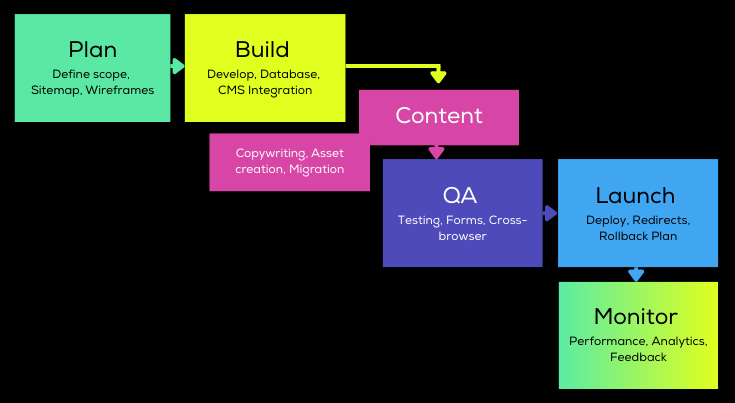
Phase 1: Launch definition (scope, success, and constraints)
A faster launch? almost always comes from making fewer late decisions. Start here.
Launch scope and acceptance criteria.
Agree on:
Launch type: net-new site, redesign, CMS migration, platform move, or app release.
Must-have pages and templates: what must ship day one vs. what can ship week two.
Critical user journeys: lead form, checkout, account signup, booking, agent locator, etc.
Quality bars: performance, accessibility, browser support, security posture.
A practical way to align is a one-page launch brief with three measurable outcomes. Examples:
Do all top-50 legacy URLs redirect to the correct new pages with 301s?
Pass Core Web Vitals targets for the top 10 landing pages?
Do forms deliver to CRM and send confirmation emails reliably?
Phase 2: Information architecture, content readiness, and SEO continuity
Most launch failures are not dev bugs? They are content and SEO mismatches: missing pages, changed URLs, inconsistent headings, and forgotten metadata.
URL inventory and redirect plan
If you are replacing an existing site, do not guess.
Crawl the current site and export URLs.
Identify top landing pages from analytics and Search Console.
Map every high-value URL to its new destination.
Decide redirect rules (exact-match redirects for key pages, pattern-based redirects where safe).
Google’s guidance on site moves emphasizes preserving signals by using proper redirects and validating in Search Console (Search Central documentation).
Metadata and indexation controls
Before launch, verify:
Title tags and meta descriptions exist for core pages.
Canonicals are intentional (especially on faceted or filtered pages).
The XML sitemap is generated and includes the correct canonical URLs.
robots.txt and meta robots reflect your intent (no accidental noindex).
If you want a deeper technical SEO baseline, Ravenna has a dedicated overview on the importance of technical SEO.
Content freeze (the underrated launch accelerator)
Set a content freeze date, even if it is partial:
Freeze navigation labels and primary page titles.
Freeze URL slugs for already-approved pages.
Allow only critical fixes after the freeze (typos, legal text, broken links).
Freezing content prevents the classic late copy change? that triggers design reflow, broken internal links, or redirect churn.
Phase 3: Design, accessibility, and front-end implementation
Modern websites are software. Treat the UI like a product surface, not a set of screenshots.
Responsive and interaction QA
Confirm:
Layout works across common breakpoints (mobile, tablet, desktop, ultra-wide).
Navigation, modals, and accordions are keyboard accessible.
Focus states are visible and consistent.
Accessibility baseline
Aim for at least WCAG 2.2 Level AA compliance for most public sites, depending on your industry and risk tolerance. The standard itself is published by W3C (WCAG 2.2).
Common pre-launch checks:
Proper heading hierarchy (H1 per page, logical H2/H3 structure).
Image alt text for informative images.
Form labels and error messaging that work with assistive tech.
Color contrast and focus indicators.
Accessibility fixes are much cheaper before launch than after content teams have scaled the site.
Phase 4: CMS and back-end readiness (authoring, permissions, and environments)
A site can look done while still being risky to operate. This phase is about making the site editable, maintainable, and safe.
Content model and authoring workflow
Validate that:
Content types match real editing needs (not a single WYSIWYG for everything).
Reusable blocks are constrained (to avoid broken layouts).
Media library rules are clear (preferred sizes, formats, and compression).
Preview and staging exist (or a documented alternative).
If you are evaluating CMS options, Ravenna has written about trade-offs between Statamic and WordPress, and what a certified Statamic agency typically helps with.
Roles, permissions, and auditability
Before launch:
Create roles for marketing, editors, and admins.
Ensure least-privilege access (especially for plugins, integrations, and deployment).
Confirm how content changes are tracked and how rollbacks work (versioning, backups, or Git-based workflows).
Configuration and secrets
A quick but critical checklist:
No secrets are committed to repositories.
Environment variables are set for production (email, storage, API keys).
Third-party webhooks have correct production endpoints.
If your stack includes Laravel, Statamic, or a custom application layer, treat configuration as deployable infrastructure rather than a last-minute checklist item.
Phase 5: Performance and reliability (speed that survives real traffic)
Performance is not just Lighthouse screenshots. It is the combination of assets, caching, server behavior, and third-party scripts.
Core Web Vitals and field reality
Google’s Core Web Vitals are still a practical set of user-centric performance signals (according to web.dev guidance). For a launch, prioritize:
Largest Contentful Paint (LCP) on key landing pages.
Interaction to Next Paint (INP) for interactive pages and menus.
Cumulative Layout Shift (CLS) across templates.
Practical performance checklist
Images: correct dimensions, modern formats when appropriate (often WebP or AVIF), lazy loading for below-the-fold.
CSS/JS: minimize bundles, remove unused libraries, and defer non-critical scripts.
Caching: page caching where possible, CDN for static assets, smart cache invalidation.
Fonts: subset or limit weights, use font-display settings.
A performance budget can be as simple as: No page ships with more than X MB of JS, and no template triggers more than Y third-party requests.
Phase 6: Security and privacy (launching without inviting problems)
Security is often reduced to: we have HTTPS. You want a more complete baseline.
Security baseline checks
HTTPS everywhere, no mixed content.
Security headers reviewed (CSP, HSTS, X-Content-Type-Options, etc.) based on your app's needs.
Dependencies updated, known vulnerabilities addressed.
Admin areas protected (strong auth, MFA where possible, IP restrictions if appropriate).
OWASP’s Top 10 is a useful reference for common web application risks.
Forms, spam, and data handling
Confirm where form submissions go (email, CRM, database) and how failures are alerted to the team.
Add spam protections appropriate to your audience and accessibility requirements.
Verify cookie consent and privacy policy behavior where required.
Phase 7: QA that matches your risk (not just click around)
A strong QA plan tests what matters most, and documents what done means.
Recommended test matrix
Use a matrix that matches your audience and analytics, but a typical baseline includes:
Chrome, Safari, Firefox, Edge (current versions)
iOS and Android mobile browsers
At least one lower-powered device check (performance and interaction)
Pre-launch test checklist table
Area | What to test | Pass criteria example | Notes |
|---|---|---|---|
Navigation | Menus, footer links, search | No broken links in main nav | Crawl plus manual spot checks |
Forms | Validation, deliverability, confirmations | Submission received and logged | Test failure mode (mail down) |
Redirects | Top legacy URLs, patterns | Correct 301 to best new page | No redirect chains |
Analytics | Events, conversions, GTM/GA | Conversions fire once | Verify in real-time debug |
SEO tech | Sitemap, robots, canonicals | Indexable pages are indexable | Block staging environments |
Performance | Key templates | Meets agreed thresholds | Re-test after tags/scripts |
Accessibility | Keyboard, labels, contrast | No critical blockers | Automated plus manual |
If you do automated testing (unit, integration, end-to-end), make sure the tests run in CI and that failures block release; otherwise, they become decorative.
Phase 8: Launch plan (deployment, DNS, monitoring, rollback)
Launch day should feel boring. The way to get there is a written runbook.
Deployment runbook essentials
Include:
Who pushes the button (and who approves).
Exact deploy steps (build, migrate, warm caches, clear queues).
DNS changes and timing (including TTL strategy).
Communication plan (internal updates, customer support readiness if needed).
Rollback plan (do not skip)
A rollback plan is not pessimism; it is professionalism.
Define the rollback trigger (example: payment failures, widespread 500 errors, homepage outage).
Define the rollback method (re-deploy previous version, revert DNS, restore backup).
Define the time window where rollback is acceptable.
Monitoring from minute one
At minimum:
Uptime monitoring and error alerts.
Log monitoring for spikes in 404s, 500s, and form failures.
Performance monitoring (synthetic or real-user monitoring if you have it).
Phase 9: Post-launch (first 72 hours, then first 30 days)
Many launch issues happen after Google crawls the new site, customers hit edge cases, and teams start publishing new content.
First 72 hours
Verify Search Console ownership and submit sitemap.
Watch coverage/indexing reports and crawl errors.
Review analytics traffic, top pages, and conversion paths.
Fix high-impact 404s quickly (add redirects, adjust internal links).
First 30 days
Audit top landing pages for performance regressions (third-party scripts are frequent culprits).
Review redirect logs and consolidate patterns.
Validate that new content creation is clean (no broken layouts, consistent metadata).
Schedule dependency and CMS updates, plus backups and restore drills.
The checklist: faster, safer launches in one view
Use this as a cut-and-paste into a project tracker.
Phase | Checklist item | Why it matters | Owner |
|---|---|---|---|
Definition | Launch brief with success metrics | Aligns scope, reduces late churn | PM/Stakeholders |
Definition | Critical journeys documented | Prevents missed “money paths� | Product/Marketing |
Content/SEO | URL inventory exported | Avoids forgotten high-value pages | SEO/PM |
Content/SEO | Redirect map approved | Preserves traffic and backlinks | SEO/Dev |
Content/SEO | Sitemap and robots plan | Controls indexation | SEO/Dev |
Content | Content freeze date set | Stabilizes build and QA | Marketing/PM |
Design/FE | Responsive checks complete | Prevents mobile launch surprises | Design/FE |
Accessibility | Keyboard and form label QA | Reduces legal and UX risk | FE/QA |
CMS/BE | Content types and blocks finalized | Prevents authoring chaos | Dev/Content |
CMS/BE | Roles and permissions configured | Reduces admin/security risk | Dev |
Integrations | Forms and CRM/email flows tested | Prevents lead loss | Dev/Marketing |
Performance | Image rules enforced | Biggest speed wins for most sites | FE/Content |
Performance | Third-party scripts reviewed | Reduces slowdowns and privacy risk | Marketing/Dev |
Security | HTTPS and headers reviewed | Blocks common attack surface | Dev/Ops |
Security | Dependency updates and scans | Reduces known vulnerabilities | Dev |
QA | Test matrix agreed | Focuses QA where it matters | QA/PM |
QA | Link crawl completed | Prevents 404s at launch | QA |
Launch | Runbook written and rehearsed | Makes launch repeatable | Dev/Ops/PM |
Launch | Rollback plan confirmed | Limits blast radius | Dev/Ops |
Post | Monitoring and alerts configured | Detects issues fast | Ops/Dev |
Post | Search Console checks and sitemap submission | Speeds indexing validation | SEO |
When this checklist is not enough
If your launch involves complex e-commerce, multi-language SEO, authenticated user areas, or a legacy platform migration, you will likely need a more detailed plan for data migration, load testing, and security review.
If you want a second set of eyes on launch readiness, Ravenna works with teams on web application development and CMS builds (including Laravel and Statamic) with an emphasis on maintainability, performance, and technical SEO. You can explore Ravenna’s approach at ravennainteractive.com.
Need this built for your business?
Ravenna is a Seattle-based team that designs and ships web platforms, mobile apps, and Laravel & Statamic builds for companies that need them done right.
Talk to Us